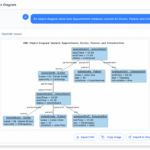
In software testing, understanding the exact state of objects at a specific moment can make the difference between catching a defect early and missing a critical issue. Object diagrams provide that clarity by showing real instance values, object relationships, and the data flow within a scenario. With an AI-powered object diagram generator, you can visualize these scenarios instantly without manual drawing, giving testers a reliable way to validate assumptions, uncover inconsistencies, and improve test coverage.
This article explores how object diagrams support test design and how AI simplifies the entire process—from creating object snapshots to refining them through conversation.
Why Testers Use Object Diagrams
Object diagrams are valuable in testing because they focus on instances, not design-level structure. They show:
-
Sample data values
-
Actual object relationships
-
The state of the system at a specific moment
-
How objects collaborate to fulfill a test case
-
The transitions before and after a key operation
Instead of imagining how data flows, you get an exact snapshot of the system’s runtime state, making it easier to validate expected behavior.
Instantly Visualize Test Scenarios with AI
Traditionally, creating object diagrams required manually entering attributes, values, and connections. That approach is slow and rarely used in real testing workflows.
With an AI diagram generator, you simply describe the scenario:
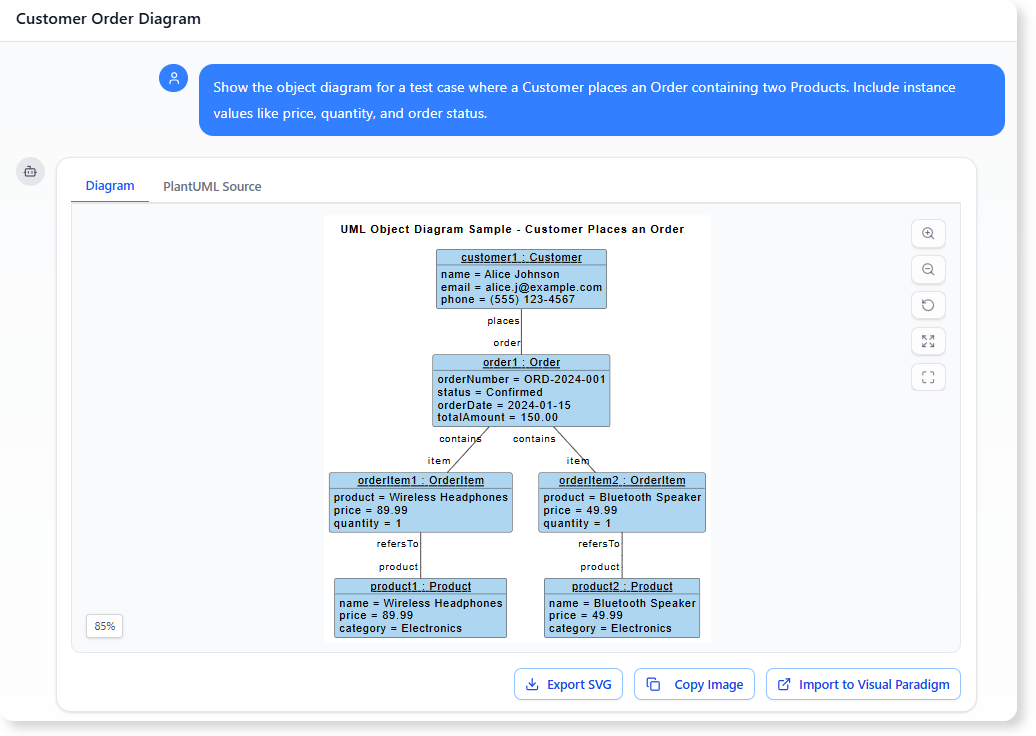
“Show the object diagram for a test case where a Customer places an Order containing two Products. Include instance values like price, quantity, and order status.”
The AI instantly creates the diagram, complete with:
- Object instances (e.g., customer1)
- Attribute values (e.g., totalAmount = 150.00)
- Object links (e.g., Order → Order items)
-
Correct UML notation
Testers can focus on verifying logic instead of building diagrams manually.
Representing Sample Data and Object States
Object diagrams are particularly useful when modeling sample data used in:
-
Unit tests
-
Integration tests
-
API testing
-
End-to-end scenarios
-
Regression scenarios
-
Scenario-based testing (e.g., booking, checkout, approval flows)
For example, a login failure test might visualize:
-
Userobject withisLocked = true -
LoginAttemptwithattemptCount = 5 -
A relationship showing the blocked state
This helps testers check if the system is expected to reject the login attempt under those conditions.
Refining Test Models Through Chat
Once the initial diagram is generated, testers can refine it naturally:
-
Add missing attributes
-
Change values
-
Introduce new objects
-
Insert relationships
-
Visualize special cases
-
Compare different states
You can simply type messages like:
“Add a Discount object and link it to Order with amount = 50.”
“Generate a version showing an invalid Payment with errorCode = 402.”
The AI updates the diagram instantly, enabling iterative test analysis without diagramming skills.
Why Visual Test Scenarios Improve Quality
Object diagrams bring several benefits to software testing:
-
Clearer test data representation
No more ambiguous test cases; values and relations are visually explicit. -
Better communication with developers
Showing object states reduces misinterpretation during debugging. -
Easier defect reproduction
Diagrams highlight the exact conditions where issues arise. -
Faster scenario validation
Teams immediately see whether data aligns with expected behaviour. -
Documentation for future reference
Testers can store diagrams alongside cases for regression testing.
By combining object diagrams with AI, teams gain a faster, more accurate method for designing and reviewing test scenarios.
Conclusion
Object diagrams bring clarity to testing by presenting real instance states and relationships in a visual snapshot. When paired with an AI diagram generator, testers can create these diagrams instantly, refine them through simple chat commands, and use them to validate workflows, identify defects, and communicate findings more effectively.
It is a powerful approach that elevates testing quality without adding extra workload.
References
- Try the AI Diagramming Chatbot — Generate diagrams from natural-language descriptions and explore how AI can help with your modeling work.
- Explore Solutions & Use Cases — See how the AI Diagramming Chatbot can help you solve real-world modeling and diagramming needs across different industries and use cases.
- Learn More About AI Diagramming Chatbot — Explore the chatbot’s features, capabilities, and how it can support your diagramming workflow.
- Stay Updated on AI Diagramming Chatbot — See the latest features, enhancements, and improvements added to the AI Diagramming Chatbot.