


UML offers many different diagram types, but few are as underrated — yet powerful — as the Composite Structure Diagram. While Class Diagrams help you define structure and Sequence Diagrams help you understand interactions, Composite Structure Diagrams go one level deeper. They reveal what is happening inside a classifier, a component, or a subsystem.
For system designers working with modular architectures, distributed components, or complex internal collaborations, this diagram becomes a valuable tool for clarifying how the pieces truly fit together.
This guide explains exactly when to use a Composite Structure Diagram, why it matters, and how it fits into modern system design workflows.
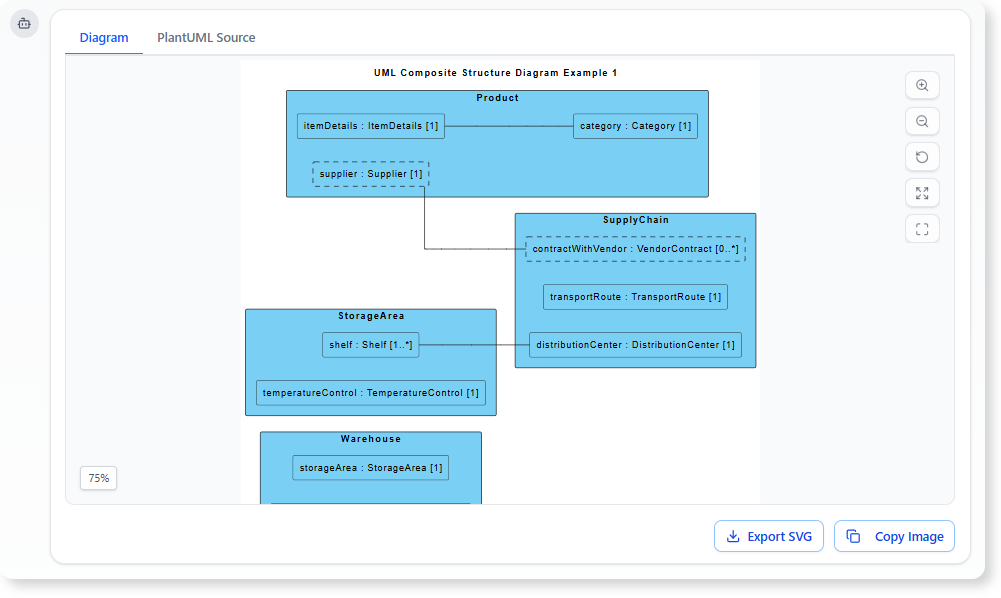
What a Composite Structure Diagram Shows
A Composite Structure Diagram visualizes the internal structure of a class, component, or system. It focuses on how internal parts collaborate, the roles they play, and how communication flows between them.
It typically includes:
-
Parts (internal instances that play roles)
-
Ports (interaction points)
-
Connectors (communication links)
-
Interfaces (provided/required behavior)
-
Collaboration roles (how internal parts work together at runtime)
Where Class Diagrams show what the system contains, Composite Structure Diagrams show how internal elements interact to perform behavior.
When to Use a Composite Structure Diagram
Below are the key scenarios where this diagram becomes uniquely valuable for system designers.
1. When You Need to Model Modular, Component-Based Systems
Modern systems often follow modular design principles — microservices, plug-in architectures, reusable engines, layered components, and more.
Composite Structure Diagrams help you:
-
break a component into internal subcomponents
-
show how the subcomponents communicate
-
illustrate provided and required interfaces
-
describe collaboration inside a single module
Example:
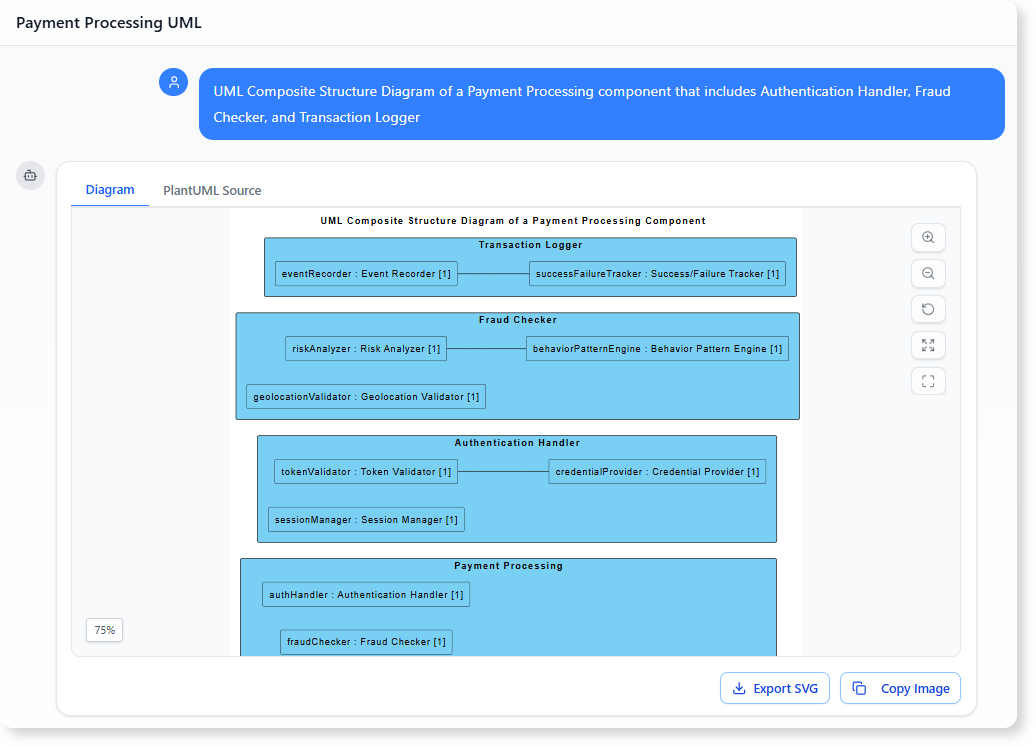
Modeling the internal structure of a Payment Processing component that includes Authentication Handler, Fraud Checker, and Transaction Logger.
This level of decomposition cannot be expressed clearly with a Class Diagram alone.
2. When Roles Are More Important Than Classes
Sometimes the same class can play different roles depending on the scenario. Composite Structure Diagrams let you model roles independent of classes, which is particularly useful in collaborations.
For example:
-
A Device object can play the role of Sensor, Controller, or Actuator in different runtime configurations.
-
An Employee object might take the role of Reviewer, Approver, or Requester.
If the collaboration is role-driven, not class-driven, this diagram is ideal.
3. When You Need to Explain Internal Messaging or Communication Flows
Many systems rely heavily on messaging patterns, such as:
-
request/response through ports
-
asynchronous notifications
-
event broadcasting
-
inter-component communication
Composite Structure Diagrams let you map precisely:
-
which port sends or receives
-
what interface is required or provided
-
how connectors route the communication
-
which internal part handles the request
This is especially useful in:
-
IoT systems
-
event-driven architecture
-
message broker interactions
-
UI widgets interacting with controllers
A Sequence Diagram might show interaction flows, but it cannot illustrate structural communication routes inside a component — that is where Composite Structure Diagrams shine.
4. When You Need to Break Down a Large Class Into Internal Parts
Some classes represent complex entities that contain internal processing engines or submodules. Composite Structure Diagrams show how such an entity is built internally.
Examples:
-
A GameEngine with a RenderingUnit, PhysicsEngine, AudioManager
-
A WorkflowEngine with TaskScheduler, RuleEvaluator, Notifier
-
A SmartHomeHub with ProtocolHandler, DeviceRegistry, EventRouter
Each part plays a specific role, and the diagram clarifies how they collaborate to deliver behavior.
5. When You Want to Document Runtime Configuration or Dynamic Composition
If parts of the system are created, replaced, or wired dynamically, Composite Structure Diagrams provide a clear visual way to express how the pieces fit together at runtime.
They help answer questions like:
-
Which parts exist only in certain configurations?
-
How does a component load or activate internal modules?
-
What roles are assigned when a collaboration starts?
This is essential for documenting:
-
plug-in–based architectures
-
runtime service injection
-
dynamically configured workflows
6. When You Need to Communicate Complex Internal Design to Stakeholders
Design reviews often struggle with questions like:
-
“What exactly is inside this component?”
-
“Who talks to whom?”
-
“Where does this processing step happen?”
-
“Which part owns this responsibility?”
Composite Structure Diagrams give you a visual explanation that goes deeper than high-level component models and clearer than raw code.
It becomes a communication bridge between:
-
architects
-
developers
-
analysts
-
QA
-
DevOps
Especially when discussing critical subsystems.
A Light Touch of AI: Speeding Up the Modeling Process
While the core value of composite structure diagrams lies in their modeling power, an AI diagram generator can help you build them faster.
A quick description like:
“Show the internal parts of a Notification Service, including MessageFormatter, TemplateStore, DeliveryHandler, and their ports.”
can instantly generate a complete diagram.
You can then refine it by simply asking:
-
“Add an event input port.”
-
“Connect DeliveryHandler to MessageBroker interface.”
-
“Show provided interfaces for TemplateStore.”
The modeling stays human-driven, but the drawing becomes effortless.
Conclusion
Composite Structure Diagrams are invaluable when you need to:
-
reveal the internal structure of components
-
show how internal roles collaborate
-
describe detailed communication routes
-
clarify modular and runtime behavior
They offer a level of insight that Class Diagrams or Component Diagrams cannot provide alone.
By mastering when and how to use them, system designers gain a powerful tool for communicating architecture clearly, reducing ambiguity, and ensuring the team understands how the system truly works beneath its surface.
References
- Try the AI Diagramming Chatbot — Generate diagrams from natural-language descriptions and explore how AI can help with your modeling work.
- Explore Solutions & Use Cases — See how the AI Diagramming Chatbot can help you solve real-world modeling and diagramming needs across different industries and use cases.
- Learn More About AI Diagramming Chatbot — Explore the chatbot’s features, capabilities, and how it can support your diagramming workflow.
- Stay Updated on AI Diagramming Chatbot — See the latest features, enhancements, and improvements added to the AI Diagramming Chatbot.