


In any growing organization, efficient operations rely on clear, repeatable processes. A Business Process Diagram (BPD)—most commonly modeled using Business Process Model and Notation (BPMN)—serves as the practical visual blueprint for these workflows. It maps out end-to-end operational activities, highlighting tasks, decision rules, events, and who handles each step. This visual clarity builds an essential bridge between operational leaders, business analysts, and implementation teams.
While mapping multi-step business procedures used to mean hours of drag-and-drop drawing in heavy diagramming applications, using an AI chatbot turns process mapping into a fast, interactive conversation.
This guide explores the essentials of Business Process Diagrams and shows you how to streamline workflow design with an AI chatbot.
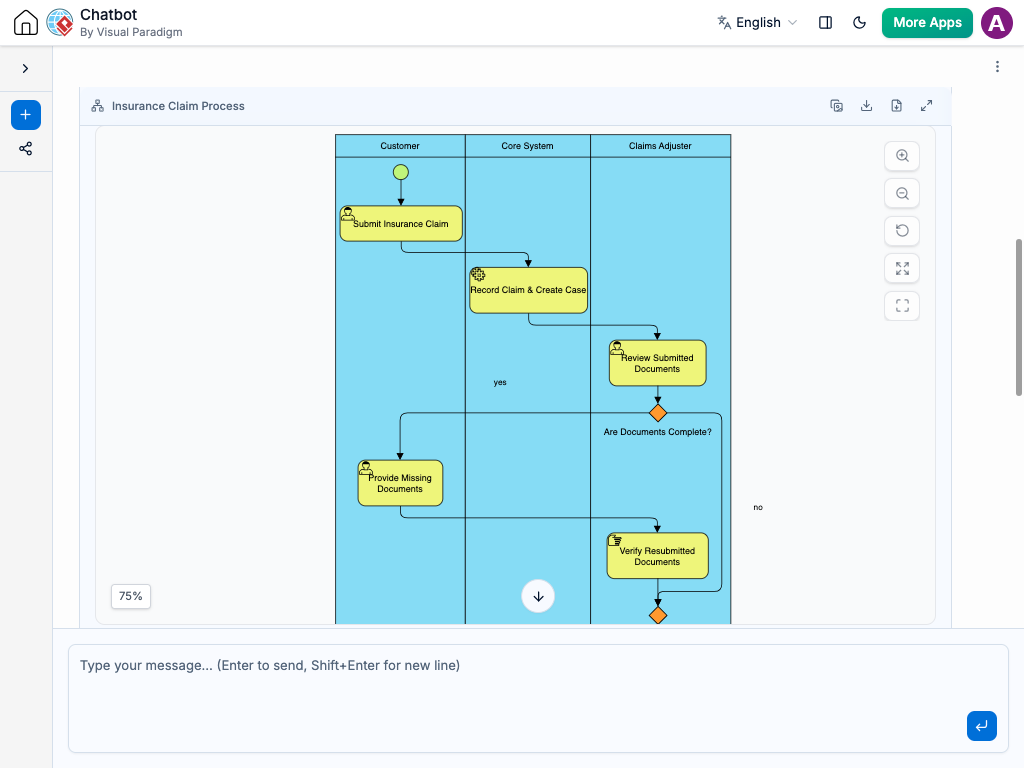
What is a Business Process Diagram?
A Business Process Diagram visualizes the step-by-step path required to reach a specific operational goal. Unlike static data models, a process map focuses on activity over time—showing how work moves across roles, where decisions are made, and how exception paths are managed.
Core BPMN Components
-
Flow Elements: The core shapes that determine how the process executes.
-
Events: Conditions that kick off, pause, or end a process (e.g., Start Event, Timer Delay, Message Received, End Event). Represented by circles.
-
Tasks & Activities: The actual work or operational actions being executed (e.g., “Validate Customer Account” or “Generate Invoice”). Represented by rounded rectangles.
-
Gateways: Decision nodes that direct the sequence flow along specific paths based on conditions (e.g., Exclusive “OR”, Parallel “AND”). Represented by diamonds.
-
-
Connecting Paths: Lines that define the path and direction of movement.
-
Sequence Flow: Indicates the execution order of steps (solid line with a solid arrow).
-
Message Flow: Highlights communication across organizational boundaries (dashed line with an open circle and arrow).
-
-
Organizational Swimlanes: Boundaries that assign operational responsibility.
-
Pools: Represent major entities or systems (e.g., “Customer Portal”, “Order System”).
-
Lanes: Sub-divisions within a pool designating specific departments or user roles (e.g., “Billing Specialist”, “Warehouse Team”).
-
Why Use an AI Chatbot for Workflow Mapping?
Creating process flows manually often leads to outdated documentation and slow iteration cycles when business rules change. An AI chatbot completely shifts how operational modeling gets done:
-
Rapid First Drafts: Describe an operational sequence in conversational language, and let the AI chatbot instantly structure it into a standard BPMN layout.
-
Bottleneck Detection & Optimization: Ask your AI chatbot to analyze a workflow draft to identify potential delays, redundant handoffs, or unhandled exception paths before rollout.
-
Instant Process Refactoring: Updating operational steps is as simple as sending a quick message to your AI chatbot, like “Add a manager approval gateway whenever a refund exceeds $500.”
-
Automated Process Documentation: Convert visual diagrams into clear Standard Operating Procedures (SOPs), user stories, or audit handovers with a single request to the AI chatbot.
Common Use Cases for Business Process Diagrams
Visual process modeling delivers clear ROI across every department:
-
Standard Operating Procedures (SOPs): Accelerate employee onboarding with step-by-step visual guides that clarify responsibilities.
-
Process Re-engineering & Optimization: Map out “As-Is” workflows to uncover friction points, then generate optimized “To-Be” models.
-
IT System & API Requirements: Communicate exact business rules and automated triggers to technical teams before software development starts.
-
Compliance & Risk Auditing: Maintain unambiguous audit trails and approval structures to meet governance and regulatory compliance standards.
How to Generate Process Maps with an AI Chatbot: Practical Prompts
Clear input leads to precise diagrams. Here are practical prompt examples you can copy and use:
-
Mapping a Basic Flow: “Create an order processing workflow starting with ‘Customer Order Submitted’ and ending with ‘Item Delivered’.”
-
Structuring Lanes: “Organize the order workflow across two lanes: ‘Sales Desk’ and ‘Fulfillment Depot’.”
-
Adding Decision Logic: “Insert a decision gateway after credit verification: If approved, route to fulfillment; if declined, notify the customer and terminate the process.”
-
Handling Process Exceptions: “Add an exception event for ‘Out of Stock’ that routes to an urgent restock sub-process.”
-
Optimization Prompts: “Refactor this process using a parallel gateway so inventory checks and payment processing occur at the exact same time.”
A Modern Workflow for Operational Teams
Incorporate an AI chatbot directly into your team’s process improvement routine:
-
Live Process Discovery: Map out cross-functional workflows live during discovery calls by feeding the AI chatbot notes as team members explain their day-to-day operations.
-
Living Operational Documentation: Keep process guides up to date continuously by using your AI chatbot to adjust diagrams as business rules change over time.
-
Cross-Functional Clarity: Shared visual workflows eliminate ambiguity between operations leaders, product managers, and software engineers.
Conclusion
Business Process Diagrams are fundamental tools for building efficient, accountable organizations. By combining established BPMN standards with the flexibility of an AI chatbot, teams can transition from tedious manual diagramming to fluid, high-level operational design. Instead of spending hours dragging shapes, you can focus on building smoother, faster, and more effective workflows.