


In web development, cloud architectures, and modern API design, JSON (JavaScript Object Notation) is the standard format for exchanging data. However, as software systems grow, nested JSON payloads, deeply structured schemas, and arrays become difficult to parse and read in raw text. A JSON Diagram acts as a visual map of your data structure, rendering keys, object trees, data types, and array relationships in a clear, graphical view. It allows developers, product managers, and data engineers to instantly understand complex data contracts.
While manually sketching out data structures or formatting massive text files can be tedious, using an AI chatbot turns JSON modeling into a fast, interactive experience.
This guide covers the essentials of JSON Diagrams and shows you how to streamline data visualization using an AI chatbot.
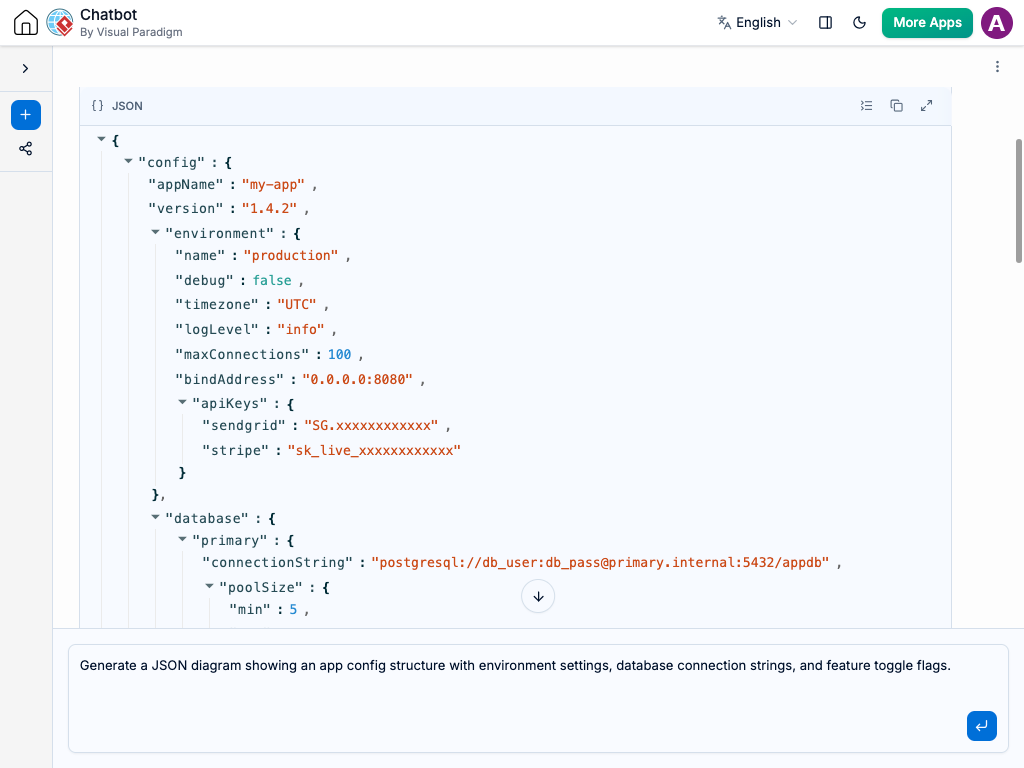
What is a JSON Diagram?
A JSON Diagram provides a visual, hierarchical representation of a JSON object or schema. Instead of scrolling through hundreds of lines of code, a JSON diagram breaks down the structure into visual nodes and connecting branches, making parent-child relationships and data hierarchies obvious at a glance.
Core JSON Diagram Components
-
Root Node: The top-level container (object or array) that holds the entire JSON dataset.
-
Objects & Keys: Visual nodes representing key-value pairs. Key names are clearly labeled alongside their corresponding data types (e.g.,
string,number,boolean,null). -
Arrays: Container nodes that illustrate ordered lists of elements or repeated object structures.
-
Nested Structures: Branching paths that clearly show child objects embedded within parent objects, eliminating confusion around deep nesting.
Why Use an AI Chatbot for JSON Diagrams?
Reading raw, unformatted JSON text files often leads to syntax errors and missed fields. An AI chatbot completely simplifies how you handle data structures:
-
Instant Payload-to-Diagram Conversion: Paste a raw JSON payload into the AI chatbot, and watch it automatically convert the data into a clean, easy-to-read diagram.
-
Automated Schema Validation: Ask your AI chatbot to identify missing required fields, invalid data types, or structural inconsistencies in your JSON trees.
-
Frictionless Data Modeling: Modifying a schema is as simple as sending a quick prompt to your AI chatbot, like “Add a nullable ‘shippingAddress’ object to the user profile tree.”
-
Automatic Code & Schema Generation: Convert visual JSON trees back into valid JSON Schemas, TypeScript interfaces, or database models with a single request.
Common Use Cases for JSON Diagrams
Visualizing JSON data brings immediate benefits across the entire development stack:
-
API Design & Documentation: Clearly communicate REST or GraphQL API request and response structures to frontend and backend developers before writing code.
-
Database & NoSQL Modeling: Design and review document-based database structures (like MongoDB or Firestore) with stakeholders before implementation.
-
Third-Party Integration: Visually map out data payloads from third-party services (such as Stripe, Shopify, or Webhooks) to understand how external data feeds into your system.
-
Team Onboarding: Provide clear visual data models so new developers can understand complex system data contracts without digging through code repositories.
How to Generate JSON Diagrams with an AI Chatbot: Practical Prompts
Clear instructions yield accurate data maps. Here are practical prompt examples you can copy and use:
-
Visualizing Raw JSON: “Convert this raw JSON payload into a clear visual JSON diagram: [paste raw JSON text]”
-
Modeling API Responses: “Create a JSON diagram representing a paginated API response containing user IDs, profile details, and an array of order objects.”
-
Defining Data Types: “Generate a JSON schema diagram for a product catalog where each product has an ID (integer), name (string), tags (array of strings), and inStock (boolean).”
-
Expanding Nested Trees: “Add an ‘address’ object containing street, city, and zip code fields under the ‘customer’ node in this diagram.”
-
Schema Refactoring: “Refactor this JSON diagram to group all contact details into a single nested ‘contactInfo’ object.”
A Modern Workflow for Development Teams
Integrate an AI chatbot directly into your team’s software design routine:
-
Interactive Technical Discussions: Model API payloads live during technical review meetings by prompting the AI chatbot as engineers outline data requirements.
-
Living Data Contracts: Keep API documentation continuously updated by using your AI chatbot to update visual diagrams whenever endpoints evolve.
-
Frontend-Backend Alignment: Share easy-to-understand visual JSON diagrams between frontend and backend engineers to ensure both sides agree on data models before building.
Conclusion
JSON Diagrams are essential tools for visualizing, designing, and communicating data structures in modern application development. By combining the simplicity of JSON with the power of an AI chatbot, teams can turn complex data payloads into clear visual maps in seconds. Instead of searching through lines of raw code or formatting errors, you can focus on building robust APIs and data-driven applications.