


In complex software systems, understanding how objects communicate and collaborate to carry out business logic is essential. A UML Communication Diagram (formerly known as a Collaboration Diagram in UML 1.x) serves as a visual map of object interactions. Unlike Sequence Diagrams—which emphasize the strict chronological order of events—Communication Diagrams focus primarily on the architectural relationships and structural organization of the participating objects while using numbered messages to show sequence.
While setting up complex object networks and mapping multi-step message paths traditionally required tedious manual drawing, using an AI chatbot makes interaction modeling fast, dynamic, and conversational.
This guide covers the core essentials of UML Communication Diagrams and demonstrates how to streamline your system interaction design using plain English prompts.
What is a UML Communication Diagram?
A Communication Diagram models how objects interact to accomplish a specific task or system behavior. By highlighting the links between objects rather than a vertical timeline, it gives developers and architects a clear, localized view of system architecture and object couplings.
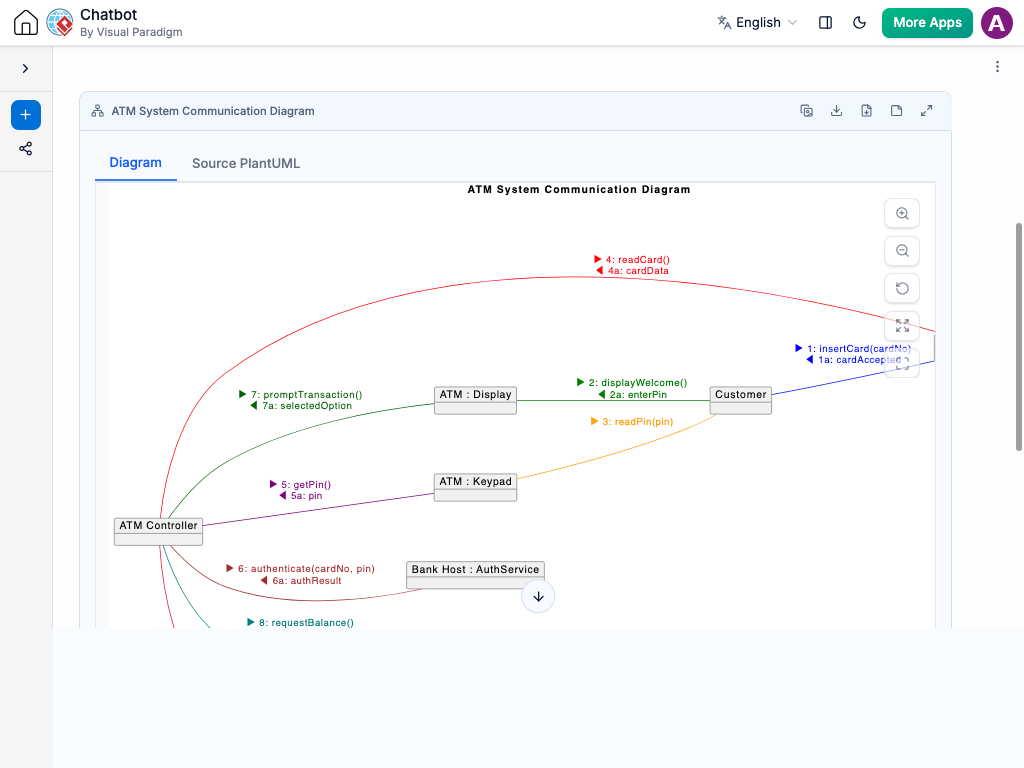
Core Communication Diagram Components
-
Objects & Roles (Rectangles): Represent the individual instances or system components participating in the interaction (e.g.,
:OrderProcessor,userCart:ShoppingCart). -
Links (Solid Lines): Connect objects that have a relationship or line of communication. A link indicates that one object can send messages to another.
-
Messages (Arrows with Text): Indicate the direction and content of the communication between linked objects.
-
Sequence Numbers: Numbers attached to messages (e.g.,
1: validate(),1.1: checkInventory(),2: confirm()) that explicitly define the order of execution without relying on a vertical timeline. -
Nested / Nested Sequence Flow: Hierarchical numbering (e.g.,
1.1,1.2) to show internal or sub-messages triggered by a parent message.
Why Use AI for Interaction Mapping?
Designing detailed object interactions manually can slow down system design and make updates cumbersome when requirements shift. An AI chatbot transforms how you create and iterate on communication models:
-
Instant Structural Layouts: Describe an interaction scenario in natural language, and let the chatbot automatically identify the participating objects, establish links, and order the messages.
-
Dependency & Coupling Analysis: Ask the AI to inspect your communication map for overly complex couplings, redundant links, or circular dependencies before writing code.
-
Rapid Flow Refactoring: Modify complex message paths easily by prompting the AI with requests like “Add a payment gateway object and route message 2 through it.”
-
Automatic Technical Documentation: Convert interactive models directly into clear developer specifications, user stories, or API communication references.
Common Use Cases for Communication Diagrams
Mapping object interactions delivers clear architectural clarity across multiple scenarios:
-
Object-Oriented Design & Refactoring: Visualize how objects delegate tasks to keep classes loosely coupled and maintain clear boundaries.
-
API & Service-to-Service Mapping: Model how microservices or internal modules send request and response payloads to complete a transaction.
-
Legacy System Discovery: Document complex, undocumented codebases by turning execution traces into clear structural interaction maps.
-
Cross-Team Architectural Reviews: Help developers, software architects, and technical leads review object responsibilities without getting bogged down in implementation details.
Practical AI Prompts for Communication Diagrams
Clear prompt construction generates precise visual maps. Here are practical prompt examples:
-
Basic Interaction Flow: “Create a communication diagram for a user login process involving a User Interface, Authentication Controller, and User Database.”
-
Adding Sub-Messages: “Add a nested message under step 1 where the Authentication Controller validates the password hash with an Encryption Service.”
-
Complex Multi-Object Routing: “Map an online shopping checkout flow showing interactions between Customer, Cart, PaymentGateway, and OrderRepository, with numbered messages for each step.”
-
Refactoring & Optimization: “Refactor this interaction to remove direct coupling between the UI and Database, routing all data access through an intermediate Controller.”
A Modern Workflow for Software Teams
Integrating an AI chatbot into your system architecture workflow streamlines development:
-
Live Architecture Discovery: Sketch out object interactions live during design sessions by feeding plain text descriptions directly into the AI chatbot.
-
Living Technical Specs: Maintain up-to-date architecture documents by asking the chatbot to update message structures whenever system APIs change.
-
Eliminate Communication Gaps: Shared visual interaction maps establish a clear, common understanding between backend developers, system architects, and technical project leads.