


Understanding complex business operations or technical workflows shouldn’t require reading pages of dense documentation. A Stepwise Flowchart turns multi-step procedures into clear, sequential visual guides that anyone on your team can follow at a glance.
By leveraging AI, you no longer need to manually draw shapes, align connectors, or format decision nodes. You can turn plain text instructions, meeting notes, or standard operating procedures (SOPs) into fully structured stepwise flowcharts in seconds.
What is a Stepwise Flowchart?
A Stepwise Flowchart is a visual diagram that maps out a procedure in strict chronological order. Unlike complex system architecture diagrams, a stepwise flowchart focuses on linear progression—guiding a user or team member from a starting point through individual action steps and decision branches to a final outcome.
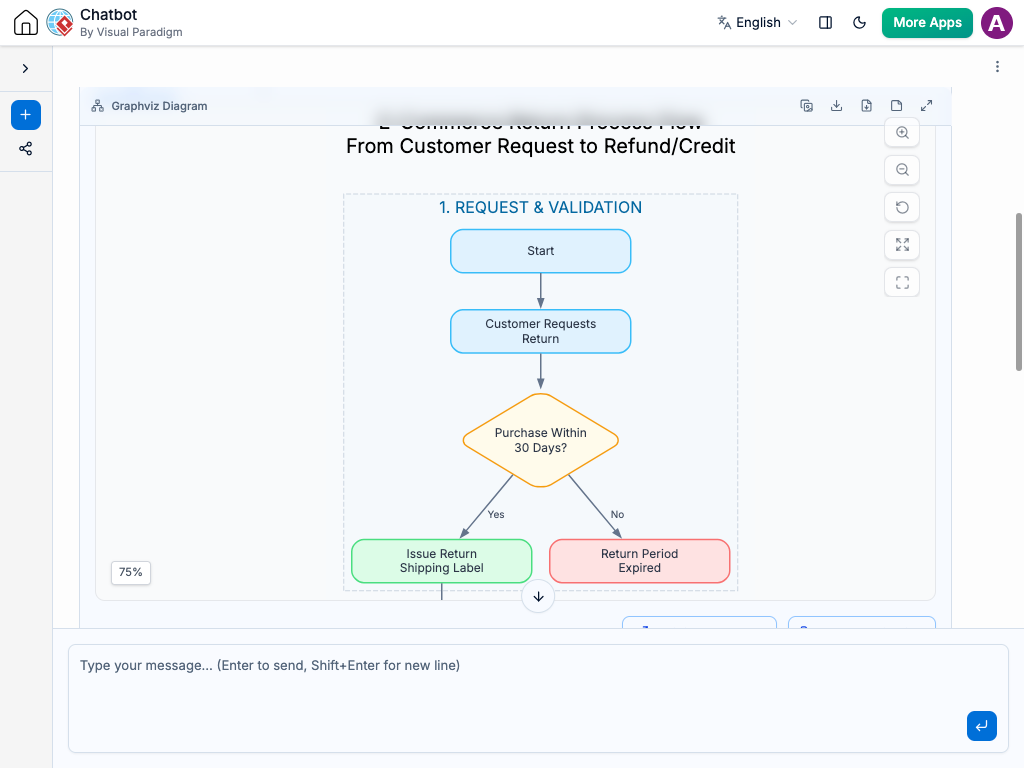
Key Components of a Stepwise Flowchart
-
Start/End Nodes: Oval or rounded shapes marking where the procedure begins and ends.
-
Action Steps: Rectangular boxes representing single tasks or actions to complete.
-
Decision Points: Diamond shapes asking clear questions (usually Yes/No or Pass/Fail) that split the path.
-
Input/Output Operations: Parallelogram shapes highlighting data, documents, or items required at specific stages.
-
Directional Flowlines: Connectors showing the exact sequence of movement.
Why Use Stepwise Flowcharts?
Documenting your workflows sequentially provides immediate benefits across various operational areas:
-
Faster Employee Onboarding: New team members can review visual SOPs to understand their daily duties without constant supervision.
-
Reduced Human Error: Clear decision trees guide support staff or technicians through troubleshooting without skipping steps.
-
Improved Process Efficiency: Laying out steps sequentially reveals bottlenecks, redundant actions, and unnecessary handoffs.
-
Clear Audit Trails: Creates a standardized reference for compliance and quality management.
Common Real-World Use Cases
Stepwise flowcharts adapt to nearly any industry or workflow:
-
E-Commerce Operations: Managing order returns, refund checks, and inventory restocks.
-
IT & Technical Support: Password resets, software installation steps, and hardware diagnostics.
-
Human Resources: New hire setup, leave request approvals, and annual review procedures.
-
Quality Assurance: Step-by-step product testing, defect reporting, and release sign-offs.
How to Generate Stepwise Flowcharts Using AI
Creating a stepwise flowchart with Visual Paradigm’s AI Chatbot takes just a few simple steps:
-
Open the AI Chatbot Workspace: Launch the diagramming workspace in your browser.
-
Describe Your Process: Enter your raw procedure or bullet points into the prompt box.
-
Specify the Diagram Type: Tell the AI to generate a “stepwise flowchart” or “step-by-step flowchart.”
-
Review and Render: The AI analyzes your text and builds the diagram automatically.
-
Refine with natural language: Ask the AI to insert missing steps, rename actions, or split decision branches using simple chat commands.
Practical AI Prompt Examples
Try using these structured prompts inside the AI Chatbot to generate instant flowcharts:
Example 1: E-Commerce Customer Return Process
Create a stepwise flowchart for an e-commerce customer returning an item, starting with Customer Requests Return, checking if the purchase is within 30 days, issuing a return shipping label if valid or ending with Return Period Expired if not, waiting for warehouse item arrival, inspecting quality, and either issuing a full refund upon passing or notifying the customer with partial credit upon failure.
Example 2: IT Self-Service Password Reset Workflow
Create a stepwise flowchart for a self-service password reset workflow, starting when a user clicks Forgot Password, prompting for email, validating email existence, sending a 6-digit verification code, granting 3 retry attempts for incorrect codes, and directing the user to set a new password before redirecting back to the login screen.
Best Practices for Designing Clear Stepwise Flowcharts
To keep your flowcharts clean, professional, and easy to read, follow these guidelines:
-
Keep One Action Per Shape: Never pack multiple tasks into a single step box. Break them down so each shape represents one discrete action.
-
Lead with Action Verbs: Start every step description with a clear verb (e.g., Verify, Upload, Check, Approve).
-
Standardize Flow Direction: Keep your diagram reading consistently from top to bottom or left to right.
-
Keep Decision Branches Binary: Limit decision points to two straightforward outcomes (Yes/No, Valid/Invalid) to maintain readability.