


Designing software applications or database architectures requires a solid structural foundation. An Entity Relationship Diagram (ERD) visualizes how database entities—such as users, orders, and products—relate to one another, making database design intuitive and clear.
By leveraging an AI Chatbot, you no longer need to manually map tables, configure primary and foreign keys, or draw cardinalities. You can convert plain-text requirements, data models, or user stories into fully structured ERDs in seconds using simple conversational prompts.
What is an Entity Relationship Diagram (ERD)?
An Entity Relationship Diagram is a visual data model that outlines the logical structure of a database. It serves as the blueprint for software developers and database engineers, ensuring data integrity, reducing redundancy, and simplifying schema creation.
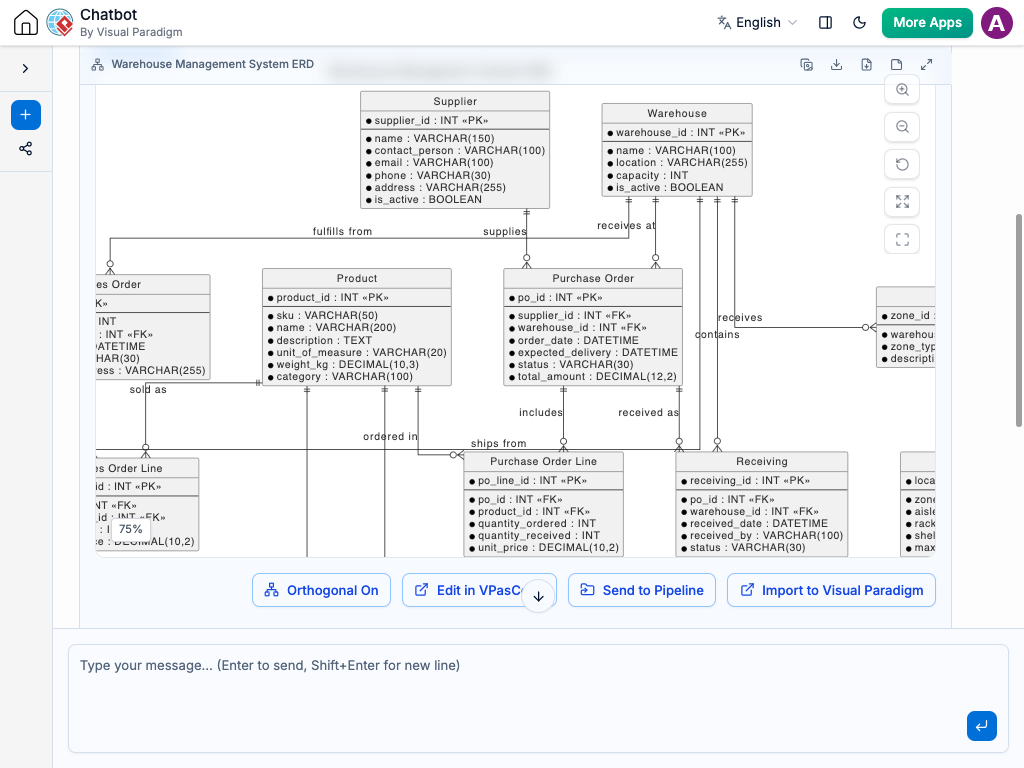
Key Components of an ERD
-
Entities: Structural tables representing real-world objects or concepts (e.g., Customer, Order, Product).
-
Attributes: Data fields or properties belonging to an entity (e.g., Customer_ID, Email, Price).
-
Primary Keys (PK): Unique identifiers assigned to individual records within an entity.
-
Foreign Keys (FK): References linking an attribute in one entity to the primary key of another entity.
-
Relationships & Cardinality: Lines indicating how entities connect along with their numerical constraints (e.g., One-to-One, One-to-Many, Many-to-Many).
Why Use Entity Relationship Diagrams?
Mapping out your database visually before writing code delivers significant development benefits:
-
Flawless Database Schema Design: Helps developers identify normalization issues and data redundancies before setting up live databases.
-
Seamless Team Collaboration: Gives software developers, product managers, and data analysts a shared visual reference for the application’s data structure.
-
Faster Technical Onboarding: Enables new developers to quickly grasp how data moves and connects across complex applications.
-
Clear System Documentation: Creates a reliable, up-to-date visual reference for future maintenance and feature additions.
Common Real-World Use Cases
Entity Relationship Diagrams are essential across almost all software engineering domains:
-
E-Commerce Applications: Mapping customers, shopping carts, orders, line items, payments, and product catalogs.
-
Healthcare Systems: Connecting patient profiles, medical records, appointment schedules, doctors, and prescriptions.
-
Financial & Banking Platforms: Structuring user accounts, transaction histories, credit lines, and bank branches.
-
SaaS & User Management: Modeling organizations, user roles, subscription plans, billing invoices, and permissions.
How to Generate ERDs Using AI Chatbot
Creating an Entity Relationship Diagram with Visual Paradigm’s AI Chatbot takes just a few simple steps:
-
Open the AI Chatbot Workspace: Launch the diagramming workspace in your browser.
-
Describe Your Data Model: Enter your database requirements, entities, or user stories directly into the AI Chatbot window.
-
Specify the Diagram Type: Tell the AI Chatbot to generate an “Entity Relationship Diagram” or “ERD.”
-
Review and Render: The AI Chatbot parses your data structure and builds the ERD automatically.
-
Refine with Natural Language: Ask the AI Chatbot to add attributes, create foreign key connections, or adjust cardinalities using quick chat commands.
Practical AI Chatbot Prompt Examples
Try using these prompt statements inside the AI Chatbot to generate instant ERDs:
Example 1: E-Commerce Storefront Database
Create an Entity Relationship Diagram for an e-commerce platform, covering Customer with customer ID, name, and email; Order with order ID, order date, and total amount; Product with product ID, name, and price; and OrderItem connecting Order and Product with quantity and unit price.
Example 2: Hospital Management System
Create an Entity Relationship Diagram for a hospital management system, modeling Patient with patient ID, name, and date of birth; Doctor with doctor ID, name, and specialization; and Appointment with appointment ID, appointment date, diagnosis, linking Doctor to Patient in a one-to-many relationship.
Best Practices for Designing Clear ERDs
To keep your entity relationship diagrams clean, accurate, and developer-friendly, follow these guidelines:
-
Use Consistent Naming Conventions: Standardize entity names as singular nouns (e.g., User instead of Users) and use clear attribute naming (e.g., user_id).
-
Always Highlight Keys: Clearly mark Primary Keys (PK) and Foreign Keys (FK) so developers can easily trace relationships.
-
Resolve Many-to-Many Relationships: Use associative junction entities (like OrderItem) to break down complex Many-to-Many connections into manageable One-to-Many relationships.
-
Keep Attributes Focused: Group relevant attributes under their specific entity rather than creating overcrowded, monolithic tables.