


When adapting Unified Modeling Language (UML) for specific domains—such as cloud architecture, embedded systems, automotive engineering, or enterprise frameworks—standard UML shapes and relationships often fall short. A UML Profile Diagram serves as the definitive metamodeling blueprint. It allows software architects and engineers to extend and customize UML for specific industries, frameworks, or platforms without altering the underlying core UML specification.
While building custom stereotypes, tagged values, and constraints traditionally required steep metamodeling expertise and tedious manual configuration, using an AI chatbot makes defining domain-specific languages (DSLs) intuitive and fast.
This guide covers the core essentials of UML Profile Diagrams and demonstrates how to streamline your metamodel customization using plain English prompts.
What is a UML Profile Diagram?
A Profile Diagram is a structural diagram that defines custom extensions to standard UML constructs. By applying profiles, teams can adapt general-purpose UML models into domain-specific languages tailored to exact technical or regulatory environments.
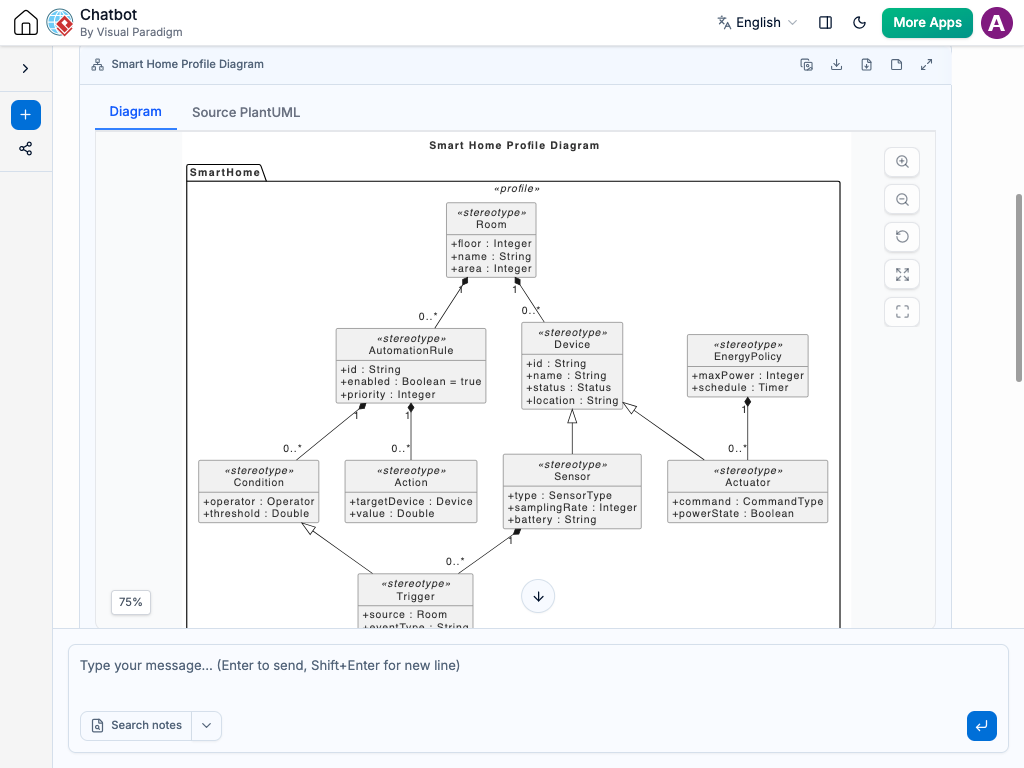
Core Profile Diagram Components
-
Profile (Package with
«profile»): The top-level container that groups custom stereotypes, extensions, and data types designed for a specific domain (e.g.,«profile» CloudArchitecture). -
Metaclass (Class with
«metaclass»): The standard UML element being extended or customized, such asClass,Component,Interface, orDependency. -
Stereotype (Class with
«stereotype»): The primary extension mechanism. Stereotypes introduce new domain-specific terminology (e.g.,«microservice»,«database»,«rest_api») that builds upon an existing Metaclass. -
Extension (Solid Arrow with Filled Diamond): The relationship connecting a Stereotype to the Metaclass it extends, pointing directly toward the target Metaclass.
-
Tagged Values: Custom properties attached to a Stereotype to store extra metadata (e.g.,
portNumber: Integer,encryptionType: String). -
Constraints (Text in
{braces}): Formal or natural language rules that enforce domain logic on the extended elements (e.g.,{must operate over HTTPS}).
Why Use AI for Profile Diagramming?
Creating UML profiles manually requires a deep understanding of the UML metamodel structure, which often leads to complex setup steps and steep learning curves. An AI chatbot transforms how domain extensions are created and maintained:
-
Instant Metamodel Generation: Describe domain requirements in natural language, and let the AI chatbot identify the right base metaclasses and structure the stereotypes automatically.
-
Consistency & Constraint Checking: Ask the AI chatbot to evaluate your profile to ensure tagged values are properly typed and stereotype extensions follow standard UML rules.
-
Rapid Domain Iteration: Update metamodel definitions easily by prompting the AI chatbot with simple instructions, such as “Add a performance SLA tagged value to all microservice stereotypes.”
-
Automated Architecture Documentation: Convert visual profile structures directly into developer reference guides, modeling guidelines, or framework implementation standards.
Common Use Cases for Profile Diagrams
Defining domain-specific extensions delivers clear standardization across specialized engineering fields:
-
Cloud Architecture & Microservices: Extend UML components into platform-specific entities like AWS Lambda functions, Docker containers, or Kubernetes pods.
-
Embedded & Real-Time Systems (MARTE): Add timing, execution bounds, and hardware constraint metadata to standard software component models.
-
Safety & Regulatory Compliance: Enforce industry standards (such as ISO 26262 or DO-178C) by defining mandatory audit tags and security constraints directly on system elements.
-
Enterprise Framework Alignment: Tailor standard UML models to match internal enterprise architecture standards and custom code-generation tools.
Practical AI Prompts for Profile Diagrams
Clear prompt construction produces precise profile definitions. Here are practical prompt examples you can copy and use:
-
Basic Profile Setup: “Create a UML profile for Web APIs extending the Class and Interface metaclasses.”
-
Defining Stereotypes & Tagged Values: “Define a «REST_Endpoint» stereotype extending Class, with tagged values for path, HTTP method, and authentication level.”
-
Applying Constraints: “Add a constraint to the «DatabaseNode» stereotype enforcing that it can only connect to elements with the «InternalService» stereotype.”
-
Refactoring Profiles: “Refactor this cloud profile to separate storage components from compute components into two distinct sub-profiles.”
A Modern Workflow for Systems Architecture
Integrating an AI chatbot into your metamodeling workflow ensures consistent modeling standards across teams:
-
Live Domain Discovery: Build custom domain profiles live during technical design discussions by feeding architectural rules directly to the AI chatbot.
-
Living Framework Guidelines: Keep domain modeling rules up to date continuously by having the AI chatbot revise profiles whenever platform standards evolve.
-
Cross-Team Standardization: Shared visual profile diagrams eliminate ambiguity between enterprise architects, framework engineers, and software developers.