


Class-Responsibility-Collaborator (CRC) Card Tutorial: AI-Powered Object-Oriented Design
In object-oriented software design, focusing too early on complex syntax or intricate diagram notations can obscure the core question: which object does what? A Class-Responsibility-Collaborator (CRC) Card Diagram offers a simple, human-centered approach to structural design. By organizing system elements into cards that detail their core responsibilities and collaborating classes, CRC cards help teams establish clear object boundaries, avoid bloated classes, and streamline role distribution.
While mapping out CRC cards during initial design sessions used to mean managing physical index cards or manually placing static shapes on a canvas, using an AI chatbot makes CRC card modeling fast, interactive, and easy to maintain.
This guide covers the core essentials of CRC Card Diagrams and demonstrates how to streamline your object-oriented design using plain English prompts.
What is a CRC Card Diagram?
A CRC Card Diagram is a lightweight structural visualization used to design object-oriented systems. Originally created as a physical brainstorming tool using $3 \times 5$ index cards, a digital CRC card layout breaks down each system class into three primary components to ensure clear separation of concerns.
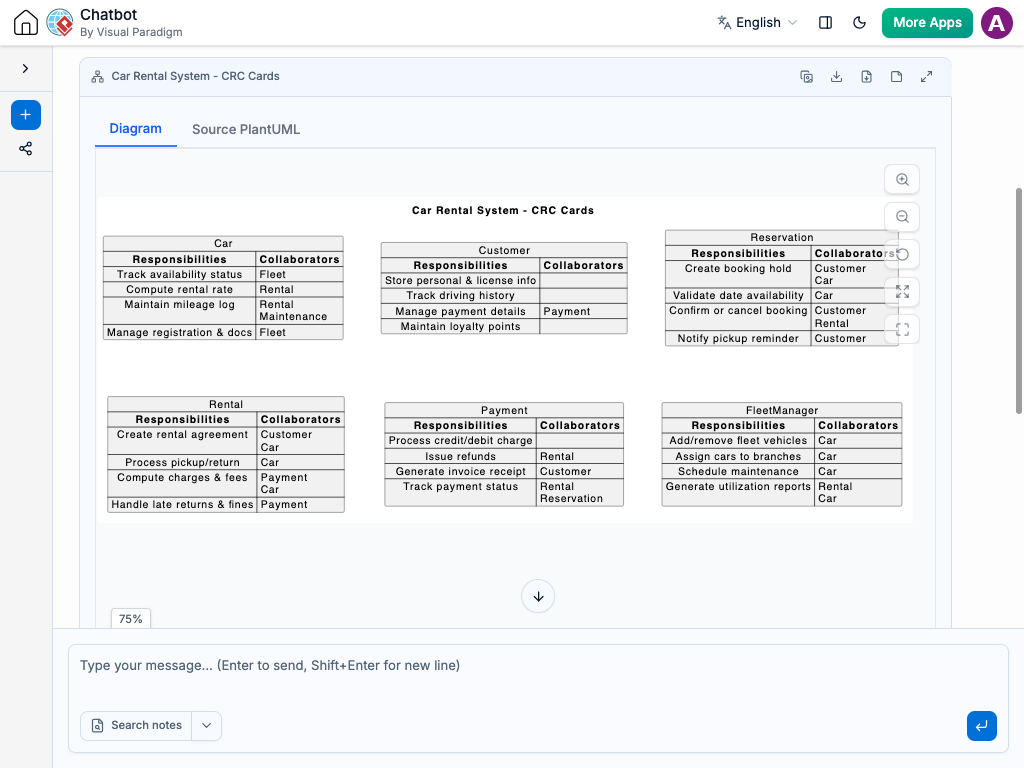
Core CRC Card Components
-
Class Name: The name of the object or system component, placed clearly at the top of the card (e.g.,
OrderProcessororShoppingCart). -
Responsibilities: The high-level duties, behaviors, and knowledge that the class is expected to manage. These state what the class knows or does (e.g., “Calculate tax total” or “Validate payment status”).
-
Collaborators: Other classes that this card must interact with or depend on to fulfill its responsibilities (e.g.,
TaxCalculator,PaymentGateway, orCustomerAccount). -
Card Relationships: Direct connection lines or groupings that visualize how responsibilities flow between classes during execution.
Why Use AI for CRC Card Modeling?
Brainstorming responsibilities manually often leads to imbalanced designs where single classes take on too many tasks. An AI chatbot transforms how software teams discover and refine object responsibilities:
-
Instant Class Decomposition: Describe a feature or subsystem in plain language, and let the AI chatbot break it down into logical classes, assign responsibilities, and identify key collaborators.
-
Single Responsibility Audit: Ask the AI chatbot to evaluate your CRC cards to catch “God objects”—classes taking on too many responsibilities—and recommend clean sub-classing.
-
Rapid Structural Refactoring: Restructure your design easily with simple messages, like “Split the notification responsibilities from OrderManager into a dedicated NotificationService card.”
-
Automated Design Specs: Convert CRC card layouts directly into UML Class Diagrams, developer user stories, or initial code stubs with a single request.
Common Use Cases for CRC Card Diagrams
CRC modeling provides immediate structural clarity during the early phases of development:
-
Early-Stage Domain Modeling: Brainstorm object roles and relationships during initial architectural discussions before writing code.
-
Refactoring Legacy Code: Map out tangled, monolithic classes onto clear CRC cards to isolate responsibilities and plan modular rewrites.
-
Object-Oriented Architecture Reviews: Help developers, architects, and technical leads verify that responsibilities are evenly balanced across classes.
-
Onboarding & Technical Alignment: Teach team members high-level system boundaries using simple, approachable card layouts instead of dense code structures.
Practical AI Prompts for CRC Cards
Clear prompt input leads to precise CRC models. Here are practical prompt examples you can copy and use:
-
Basic System Decomposition: “Create a set of CRC cards for an e-commerce checkout system, identifying the key classes, their responsibilities, and collaborators.”
-
Refactoring & Splitting Responsibilities: “Audit this OrderProcessor CRC card and separate its data persistence duties into a new OrderRepository card.”
-
Adding Collaborators: “Update the ShoppingCart CRC card to include a DiscountEngine collaborator for promotional pricing logic.”
-
Mapping Interaction Flows: “Generate CRC cards showing how Customer, AuthManager, and SessionStore collaborate during user login.”
A Modern Workflow for Software Teams
Integrating an AI chatbot into your object design routine speeds up initial system discovery:
-
Live Design Discovery: Map out object responsibilities live during team whiteboard sessions by feeding discussion notes directly into the AI chatbot.
-
Living System Blueprints: Keep object responsibilities up to date continuously by using your AI chatbot to update cards as feature requirements evolve.
-
Cross-Team Clarity: Simple card representations eliminate ambiguity between backend developers, software architects, and product leads.